Bash Bunny: Unterschied zwischen den Versionen
Zur Navigation springen
Zur Suche springen
| (76 dazwischenliegende Versionen desselben Benutzers werden nicht angezeigt) | |||
| Zeile 1: | Zeile 1: | ||
| + | =Useful Information= | ||
| + | * Bash Bunny needs up to 7 seconds to Boot | ||
| + | |||
| + | [[Datei:Bash Bunny.png]] | ||
| + | |||
| + | ==Directory== | ||
| + | |||
| + | |||
| + | [[Datei:Bash Bunny Dir.png]] | ||
| + | /docs - home to documentation. | ||
| + | /languages - install additional HID Keyboard layouts/languages. | ||
| + | /loot - used by payloads to store logs and other data | ||
| + | /tools - used to install additional deb packages and other tools. | ||
| + | /payloads - home to active payloads, library and extensions | ||
| + | /payloads/switch1 and /payloads/switch2 - home to payload.txt and accompanying files which will be executed on boot. | ||
| + | /payloads/library - home to the payloads library which can be downloaded from the Bash Bunny Payload git repository | ||
| + | /payloads/library/extensions - home to Bunny Script extensions | ||
| + | |||
=Spezifikationen= | =Spezifikationen= | ||
*ARM Cortex A7 Quad-Core Prozessor mit 1,3 Ghz | *ARM Cortex A7 Quad-Core Prozessor mit 1,3 Ghz | ||
| + | *8 GB NAND SSD | ||
*1 GB DDR3 Ram | *1 GB DDR3 Ram | ||
*MixroSD XC Laufwerk mit einer max. Kapazität von 2 TB | *MixroSD XC Laufwerk mit einer max. Kapazität von 2 TB | ||
*Bluetooth LE | *Bluetooth LE | ||
| + | ==Syntax== | ||
| + | |||
| + | ===Bunny Script=== | ||
| + | {| class="wikitable" style="vertical-align:middle;" | ||
| + | |- style="font-weight:bold; text-align:center;" | ||
| + | ! COMMAND | ||
| + | ! Description | ||
| + | |- | ||
| + | | ATTACKMODE | ||
| + | | Specifies the USB device or combination of devices to emulate. | ||
| + | |- | ||
| + | | LED | ||
| + | | Control the RGB LED. Accepts color and pattern or payload state. | ||
| + | |- | ||
| + | | QUACK | ||
| + | | Injects keystrokes (ducky script) or specified ducky script file. | ||
| + | |- | ||
| + | | Q | ||
| + | | Alias for QUACK | ||
| + | |- | ||
| + | | DUCKY_LANG | ||
| + | | Set the HID Keyboard language. e.g: DUCKY_LANG us | ||
| + | |} | ||
| + | |||
| + | ===Extensions=== | ||
| + | |||
| + | {| class="wikitable" style="vertical-align:middle;" | ||
| + | |- style="font-weight:bold; text-align:center;" | ||
| + | ! COMMAND | ||
| + | ! Description | ||
| + | ! Example | ||
| + | |- | ||
| + | | RUN | ||
| + | | Keystroke injection shortcut for mutli-OS command execution. | ||
| + | | RUN WIN notepad.exe | ||
| + | |- | ||
| + | | | ||
| + | | | ||
| + | | RUN OSX terminal | ||
| + | |- | ||
| + | | | ||
| + | | | ||
| + | | RUN UNITY xterm | ||
| + | |- | ||
| + | | GET | ||
| + | | Exports system variables | ||
| + | | GET TARGET_IP # exports $TARGET_IP | ||
| + | |- | ||
| + | | | ||
| + | | | ||
| + | | GET TARGET_HOSTNAME # exports $TARGET_HOSTNAME | ||
| + | |- | ||
| + | | | ||
| + | | | ||
| + | | GET HOST_IP # exports $HOST_IP | ||
| + | |- | ||
| + | | | ||
| + | | | ||
| + | | GET SWITCH_POSITION # exports $SWITCH_POSITION | ||
| + | |- | ||
| + | | REQUIRETOOL | ||
| + | | Exits payload with LED FAIL state if the specified tool is not found in /tools | ||
| + | | REQUIRETOOL impacket | ||
| + | |- | ||
| + | | DUCKY_LANG | ||
| + | | Accepts two letter country code to set the HID injection language for subsequent ducky script / QUACK commands | ||
| + | | DUCKY_LANG de | ||
| + | |} | ||
| + | ===ATTACKMODE=== | ||
| + | {| class="wikitable" style="vertical-align:middle;" | ||
| + | |- style="font-weight:bold; text-align:center;" | ||
| + | ! ATTACKMODE | ||
| + | ! Type | ||
| + | ! Description | ||
| + | |- | ||
| + | | SERIAL | ||
| + | | ACM - Abstract Control Model | ||
| + | | Serial Console | ||
| + | |- | ||
| + | | ECM_ETHERNET | ||
| + | | ECM - Ethernet Control Model | ||
| + | | Linux/Mac/Android Ethernet Adapter | ||
| + | |- | ||
| + | | RNDIS_ETHERNET | ||
| + | | RNDIS - Remote Network Drv Int Spec | ||
| + | | Windows (and some Linux) Ethernet Adapter | ||
| + | |- | ||
| + | | STORAGE | ||
| + | | UMS - USB Mass Storage | ||
| + | | Flash Drive | ||
| + | |- | ||
| + | | HID | ||
| + | | HID - Human Interface Device | ||
| + | | Keyboard - Keystroke Injection via Ducky Script | ||
| + | |- | ||
| + | | OFF | ||
| + | | NONE | ||
| + | | Disables the USB interface until ATTACKMODE is executed | ||
| + | |} | ||
| + | |||
| + | {| class="wikitable" style="vertical-align:middle;" | ||
| + | |- style="font-weight:bold; text-align:center;" | ||
| + | ! ATTACKMODE COMBINATION | ||
| + | ! VID / PID | ||
| + | |- | ||
| + | | SERIAL STORAGE | ||
| + | | 0xF000/0xFFF0 | ||
| + | |- | ||
| + | | HID | ||
| + | | 0xF000/0xFF01 | ||
| + | |- | ||
| + | | STORAGE | ||
| + | | 0xF000/0xFF10 | ||
| + | |- | ||
| + | | SERIAL | ||
| + | | 0xF000/0xFF11 | ||
| + | |- | ||
| + | | RNDIS_ETHERNET | ||
| + | | 0xF000/0xFF12 | ||
| + | |- | ||
| + | | ECM_ETHERNET | ||
| + | | 0xF000/0xFF13 | ||
| + | |- | ||
| + | | HID SERIAL | ||
| + | | 0xF000/0xFF14 | ||
| + | |- | ||
| + | | HID STORAGE | ||
| + | | 0xF000/0xFF02 | ||
| + | |- | ||
| + | | HID RNDIS_ETHERNET | ||
| + | | 0xF000/0xFF03 | ||
| + | |- | ||
| + | | HID ECM_ETHERNET | ||
| + | | 0xF000/0xFF04 | ||
| + | |- | ||
| + | | HID STORAGE RNDIS_ETHERNET | ||
| + | | 0xF000/0xFF05 | ||
| + | |- | ||
| + | | HID STORAGE ECM_ETHERNET | ||
| + | | 0xF000/0xFF06 | ||
| + | |- | ||
| + | | SERIAL RNDIS_ETHERNET | ||
| + | | 0xF000/0xFF07 | ||
| + | |- | ||
| + | | SERIAL ECM_ETHERNET | ||
| + | | 0xF000/0xFF08 | ||
| + | |- | ||
| + | | STORAGE RNDIS_ETHERNET | ||
| + | | 0xF000/0xFF20 | ||
| + | |- | ||
| + | | STORAGE ECM_ETHERNET | ||
| + | | 0xF000/0xFF21 | ||
| + | |} | ||
| + | ===VID and PID=== | ||
| + | *USB devices identify themselves by combinations of vendor ID and product ID | ||
| + | *These 16-bit IDs are specified in hex and are used by the victim PC to find drivers | ||
| + | *VID and PID may be spoofed using the VID and PID parameters for ATTACKMODE | ||
| + | ATTACKMODE HID STORAGE VID_0XF000 PID_0X1234 | ||
| + | |||
| + | ===LED=== | ||
| + | ====LED Colors==== | ||
| + | {| class="wikitable" style="vertical-align:middle;" | ||
| + | |- style="font-weight:bold; text-align:center;" | ||
| + | ! COMMAND | ||
| + | ! Description | ||
| + | |- | ||
| + | | R | ||
| + | | Red | ||
| + | |- | ||
| + | | G | ||
| + | | Green | ||
| + | |- | ||
| + | | B | ||
| + | | Blue | ||
| + | |- | ||
| + | | Y | ||
| + | | Yellow (AKA as Amber) | ||
| + | |- | ||
| + | | C | ||
| + | | Cyan (AKA Light Blue) | ||
| + | |- | ||
| + | | M | ||
| + | | Magenta (AKA Violet or Purple) | ||
| + | |- | ||
| + | | W | ||
| + | | White | ||
| + | |} | ||
| + | ====LED Pattern==== | ||
| + | {| class="wikitable" style="vertical-align:middle;" | ||
| + | |- style="font-weight:bold; text-align:center;" | ||
| + | ! PATTERN | ||
| + | ! Description | ||
| + | |- | ||
| + | | style="vertical-align:middle;" | SOLID | ||
| + | | style="font-style:italic;" | Default No blink. Used if pattern argument is ommitted | ||
| + | |- style="vertical-align:middle;" | ||
| + | | SLOW | ||
| + | | Symmetric 1000ms ON, 1000ms OFF, repeating | ||
| + | |- style="vertical-align:middle;" | ||
| + | | FAST | ||
| + | | Symmetric 100ms ON, 100ms OFF, repeating | ||
| + | |- style="vertical-align:middle;" | ||
| + | | VERYFAST | ||
| + | | Symmetric 10ms ON, 10ms OFF, repeating | ||
| + | |- style="vertical-align:middle;" | ||
| + | | SINGLE | ||
| + | | 1 100ms blink(s) ON followed by 1 second OFF, repeating | ||
| + | |- style="vertical-align:middle;" | ||
| + | | DOUBLE | ||
| + | | 2 100ms blink(s) ON followed by 1 second OFF, repeating | ||
| + | |- style="vertical-align:middle;" | ||
| + | | TRIPLE | ||
| + | | 3 100ms blink(s) ON followed by 1 second OFF, repeating | ||
| + | |- style="vertical-align:middle;" | ||
| + | | QUAD | ||
| + | | 4 100ms blink(s) ON followed by 1 second OFF, repeating | ||
| + | |- style="vertical-align:middle;" | ||
| + | | QUIN | ||
| + | | 5 100ms blink(s) ON followed by 1 second OFF, repeating | ||
| + | |- style="vertical-align:middle;" | ||
| + | | ISINGLE | ||
| + | | 1 100ms blink(s) OFF followed by 1 second ON, repeating | ||
| + | |- style="vertical-align:middle;" | ||
| + | | IDOUBLE | ||
| + | | 2 100ms blink(s) OFF followed by 1 second ON, repeating | ||
| + | |- style="vertical-align:middle;" | ||
| + | | ITRIPLE | ||
| + | | 3 100ms blink(s) OFF followed by 1 second ON, repeating | ||
| + | |- style="vertical-align:middle;" | ||
| + | | IQUAD | ||
| + | | 4 100ms blink(s) OFF followed by 1 second ON, repeating | ||
| + | |- style="vertical-align:middle;" | ||
| + | | IQUIN | ||
| + | | 5 100ms blink(s) OFF followed by 1 second ON, repeating | ||
| + | |- style="vertical-align:middle;" | ||
| + | | SUCCESS | ||
| + | | 1000ms VERYFAST blink followed by SOLID | ||
| + | |- style="vertical-align:middle;" | ||
| + | | 1-10000 | ||
| + | | Custom value in ms for continuous symmetric blinking | ||
| + | |} | ||
| + | |||
| + | ====LED State==== | ||
| + | {| class="wikitable" style="vertical-align:middle;" | ||
| + | |- style="font-weight:bold; text-align:center;" | ||
| + | ! STATE | ||
| + | ! COLOR PATTERN | ||
| + | ! Description | ||
| + | |- | ||
| + | | SETUP | ||
| + | | style="font-style:italic;" | M SOLID | ||
| + | | Magenta solid | ||
| + | |- | ||
| + | | FAIL | ||
| + | | R SLOW | ||
| + | | Red slow blink | ||
| + | |- | ||
| + | | FAIL1 | ||
| + | | R SLOW | ||
| + | | Red slow blink | ||
| + | |- | ||
| + | | FAIL2 | ||
| + | | R FAST | ||
| + | | Red fast blink | ||
| + | |- | ||
| + | | FAIL3 | ||
| + | | R VERYFAST | ||
| + | | Red very fast blink | ||
| + | |- | ||
| + | | ATTACK | ||
| + | | Y SINGLE | ||
| + | | Yellow single blink | ||
| + | |- | ||
| + | | STAGE1 | ||
| + | | Y SINGLE | ||
| + | | Yellow single blink | ||
| + | |- | ||
| + | | STAGE2 | ||
| + | | Y DOUBLE | ||
| + | | Yellow double blink | ||
| + | |- | ||
| + | | STAGE3 | ||
| + | | Y TRIPLE | ||
| + | | Yellow triple blink | ||
| + | |- | ||
| + | | STAGE4 | ||
| + | | Y QUAD | ||
| + | | Yellow quadruple blink | ||
| + | |- | ||
| + | | STAGE5 | ||
| + | | Y QUIN | ||
| + | | Yellow quintuple blink | ||
| + | |- | ||
| + | | SPECIAL | ||
| + | | C ISINGLE | ||
| + | | Cyan inverted single blink | ||
| + | |- | ||
| + | | SPECIAL1 | ||
| + | | C ISINGLE | ||
| + | | Cyan inverted single blink | ||
| + | |- | ||
| + | | SPECIAL2 | ||
| + | | C IDOUBLE | ||
| + | | Cyan inverted double blink | ||
| + | |- | ||
| + | | SPECIAL3 | ||
| + | | C ITRIPLE | ||
| + | | Cyan inverted triple blink | ||
| + | |- | ||
| + | | SPECIAL4 | ||
| + | | C IQUAD | ||
| + | | Cyan inverted quadriple blink | ||
| + | |- | ||
| + | | SPECIAL5 | ||
| + | | C IQUIN | ||
| + | | Cyan inverted quintuple blink | ||
| + | |- | ||
| + | | CLEANUP | ||
| + | | W FAST | ||
| + | | White fast blink | ||
| + | |- | ||
| + | | FINISH | ||
| + | | G SUCCESS | ||
| + | | Green 1000ms VERYFAST blink followed by SOLID | ||
| + | |} | ||
| + | |||
| + | ==Beispiel== | ||
| + | *[[File Grabber]] | ||
| + | *[[Root Zertifikat Install]] | ||
Aktuelle Version vom 23. September 2021, 08:33 Uhr
Useful Information
- Bash Bunny needs up to 7 seconds to Boot

Directory
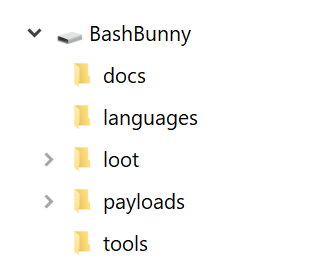 /docs - home to documentation.
/languages - install additional HID Keyboard layouts/languages.
/loot - used by payloads to store logs and other data
/tools - used to install additional deb packages and other tools.
/payloads - home to active payloads, library and extensions
/payloads/switch1 and /payloads/switch2 - home to payload.txt and accompanying files which will be executed on boot.
/payloads/library - home to the payloads library which can be downloaded from the Bash Bunny Payload git repository
/payloads/library/extensions - home to Bunny Script extensions
/docs - home to documentation.
/languages - install additional HID Keyboard layouts/languages.
/loot - used by payloads to store logs and other data
/tools - used to install additional deb packages and other tools.
/payloads - home to active payloads, library and extensions
/payloads/switch1 and /payloads/switch2 - home to payload.txt and accompanying files which will be executed on boot.
/payloads/library - home to the payloads library which can be downloaded from the Bash Bunny Payload git repository
/payloads/library/extensions - home to Bunny Script extensions

Spezifikationen
- ARM Cortex A7 Quad-Core Prozessor mit 1,3 Ghz
- 8 GB NAND SSD
- 1 GB DDR3 Ram
- MixroSD XC Laufwerk mit einer max. Kapazität von 2 TB
- Bluetooth LE
Syntax
Bunny Script
| COMMAND | Description |
|---|---|
| ATTACKMODE | Specifies the USB device or combination of devices to emulate. |
| LED | Control the RGB LED. Accepts color and pattern or payload state. |
| QUACK | Injects keystrokes (ducky script) or specified ducky script file. |
| Q | Alias for QUACK |
| DUCKY_LANG | Set the HID Keyboard language. e.g: DUCKY_LANG us |
Extensions
| COMMAND | Description | Example |
|---|---|---|
| RUN | Keystroke injection shortcut for mutli-OS command execution. | RUN WIN notepad.exe |
| RUN OSX terminal | ||
| RUN UNITY xterm | ||
| GET | Exports system variables | GET TARGET_IP # exports $TARGET_IP |
| GET TARGET_HOSTNAME # exports $TARGET_HOSTNAME | ||
| GET HOST_IP # exports $HOST_IP | ||
| GET SWITCH_POSITION # exports $SWITCH_POSITION | ||
| REQUIRETOOL | Exits payload with LED FAIL state if the specified tool is not found in /tools | REQUIRETOOL impacket |
| DUCKY_LANG | Accepts two letter country code to set the HID injection language for subsequent ducky script / QUACK commands | DUCKY_LANG de |
ATTACKMODE
| ATTACKMODE | Type | Description |
|---|---|---|
| SERIAL | ACM - Abstract Control Model | Serial Console |
| ECM_ETHERNET | ECM - Ethernet Control Model | Linux/Mac/Android Ethernet Adapter |
| RNDIS_ETHERNET | RNDIS - Remote Network Drv Int Spec | Windows (and some Linux) Ethernet Adapter |
| STORAGE | UMS - USB Mass Storage | Flash Drive |
| HID | HID - Human Interface Device | Keyboard - Keystroke Injection via Ducky Script |
| OFF | NONE | Disables the USB interface until ATTACKMODE is executed |
| ATTACKMODE COMBINATION | VID / PID |
|---|---|
| SERIAL STORAGE | 0xF000/0xFFF0 |
| HID | 0xF000/0xFF01 |
| STORAGE | 0xF000/0xFF10 |
| SERIAL | 0xF000/0xFF11 |
| RNDIS_ETHERNET | 0xF000/0xFF12 |
| ECM_ETHERNET | 0xF000/0xFF13 |
| HID SERIAL | 0xF000/0xFF14 |
| HID STORAGE | 0xF000/0xFF02 |
| HID RNDIS_ETHERNET | 0xF000/0xFF03 |
| HID ECM_ETHERNET | 0xF000/0xFF04 |
| HID STORAGE RNDIS_ETHERNET | 0xF000/0xFF05 |
| HID STORAGE ECM_ETHERNET | 0xF000/0xFF06 |
| SERIAL RNDIS_ETHERNET | 0xF000/0xFF07 |
| SERIAL ECM_ETHERNET | 0xF000/0xFF08 |
| STORAGE RNDIS_ETHERNET | 0xF000/0xFF20 |
| STORAGE ECM_ETHERNET | 0xF000/0xFF21 |
VID and PID
- USB devices identify themselves by combinations of vendor ID and product ID
- These 16-bit IDs are specified in hex and are used by the victim PC to find drivers
- VID and PID may be spoofed using the VID and PID parameters for ATTACKMODE
ATTACKMODE HID STORAGE VID_0XF000 PID_0X1234
LED
LED Colors
| COMMAND | Description |
|---|---|
| R | Red |
| G | Green |
| B | Blue |
| Y | Yellow (AKA as Amber) |
| C | Cyan (AKA Light Blue) |
| M | Magenta (AKA Violet or Purple) |
| W | White |
LED Pattern
| PATTERN | Description |
|---|---|
| SOLID | Default No blink. Used if pattern argument is ommitted |
| SLOW | Symmetric 1000ms ON, 1000ms OFF, repeating |
| FAST | Symmetric 100ms ON, 100ms OFF, repeating |
| VERYFAST | Symmetric 10ms ON, 10ms OFF, repeating |
| SINGLE | 1 100ms blink(s) ON followed by 1 second OFF, repeating |
| DOUBLE | 2 100ms blink(s) ON followed by 1 second OFF, repeating |
| TRIPLE | 3 100ms blink(s) ON followed by 1 second OFF, repeating |
| QUAD | 4 100ms blink(s) ON followed by 1 second OFF, repeating |
| QUIN | 5 100ms blink(s) ON followed by 1 second OFF, repeating |
| ISINGLE | 1 100ms blink(s) OFF followed by 1 second ON, repeating |
| IDOUBLE | 2 100ms blink(s) OFF followed by 1 second ON, repeating |
| ITRIPLE | 3 100ms blink(s) OFF followed by 1 second ON, repeating |
| IQUAD | 4 100ms blink(s) OFF followed by 1 second ON, repeating |
| IQUIN | 5 100ms blink(s) OFF followed by 1 second ON, repeating |
| SUCCESS | 1000ms VERYFAST blink followed by SOLID |
| 1-10000 | Custom value in ms for continuous symmetric blinking |
LED State
| STATE | COLOR PATTERN | Description |
|---|---|---|
| SETUP | M SOLID | Magenta solid |
| FAIL | R SLOW | Red slow blink |
| FAIL1 | R SLOW | Red slow blink |
| FAIL2 | R FAST | Red fast blink |
| FAIL3 | R VERYFAST | Red very fast blink |
| ATTACK | Y SINGLE | Yellow single blink |
| STAGE1 | Y SINGLE | Yellow single blink |
| STAGE2 | Y DOUBLE | Yellow double blink |
| STAGE3 | Y TRIPLE | Yellow triple blink |
| STAGE4 | Y QUAD | Yellow quadruple blink |
| STAGE5 | Y QUIN | Yellow quintuple blink |
| SPECIAL | C ISINGLE | Cyan inverted single blink |
| SPECIAL1 | C ISINGLE | Cyan inverted single blink |
| SPECIAL2 | C IDOUBLE | Cyan inverted double blink |
| SPECIAL3 | C ITRIPLE | Cyan inverted triple blink |
| SPECIAL4 | C IQUAD | Cyan inverted quadriple blink |
| SPECIAL5 | C IQUIN | Cyan inverted quintuple blink |
| CLEANUP | W FAST | White fast blink |
| FINISH | G SUCCESS | Green 1000ms VERYFAST blink followed by SOLID |